A YouTube description is the second most important piece of metadata on any video after the title. YouTube reads it to categorize your content, match it to search queries, and decide which suggested feeds to place it in.
Most creators treat it as an afterthought. A YouTube description template fixes that by giving you a proven structure to fill in before every upload rather than writing from a blank field under time pressure.
This guide gives you 15 copy-paste YouTube description templates: the master structure, ready blocks for every video type and niche, a full worked example, and channel description templates, plus the best practices that apply to all of them. If you would rather not fill anything in by hand, you can generate one instantly instead.
Generate a full description in secondsSkip the blank field. The free YouTube description generator builds a keyword-optimized description with summary, timestamps, links, and hashtags, ready to paste into Studio. No signup.Open the description generator →Why YouTube Descriptions Matter More Than Most Creators Think
YouTube cannot watch your video before deciding where to distribute it. It reads your metadata first. Your title, description, and tags are the three signals it uses to categorize your content and match it to the right search queries and suggested feeds. A weak description leaves that categorization incomplete.
The description field has two distinct zones that serve different purposes:
| Zone | Character Range | Who Reads It | What It Does |
|---|---|---|---|
| Above the fold | First 200 characters | Viewers and algorithm | Hook the viewer, front-load primary keyword |
| Below the fold | Characters 201 to 5,000 | Algorithm and engaged viewers | Supporting keywords, links, timestamps, CTAs |
The first 200 characters appear above the "Show More" button on both desktop and mobile without the viewer needing to expand the description. Most viewers never click Show More. That makes the opening two sentences the most valuable real estate in your entire description.
Everything above the fold should earn its place. Your primary keyword belongs in the first sentence. Your supporting keyword variation belongs in the second. Everything else goes below the fold where it adds SEO value without competing for the viewer's attention in the critical first impression window.
If you are not sure which keyword to front-load, run the topic through the free keyword research tool first. It surfaces the terms with real search demand so the opening line targets something people really search for.
A strong description and a strong title work as a combined SEO signal. YouTube reads both together to build its understanding of your video's topic. A title targeting one keyword and a description targeting a completely different one sends a conflicting signal that weakens both.
The YouTube Video Description Template
This is the master YouTube video description template you can apply to every upload. Each section has a specific job. Fill them in order and the description is complete before you publish.
Section 1: Hook and Keyword Opening (First 200 Characters)
State what the video covers and include your primary keyword naturally in the first sentence. Add a supporting keyword variation in the second. Keep this to two sentences maximum. Everything in this section appears above the Show More button without the viewer needing to expand the description.
Example: "In this video you will learn how to write a YouTube description that ranks in search and keeps viewers watching. This complete YouTube description template covers every section from keyword placement to CTAs."
Section 2: Video Summary (100 to 150 Words)
Expand on the opening with a short paragraph summarizing what the viewer will learn. Use natural keyword variations throughout. Cover the main problem the video solves, the key points addressed, and who the video is most useful for.
Section 3: Timestamps and Chapters
Add timestamped chapters for any video over five minutes. Format them as:
Section 4: Call to Action and Next Video Link
One primary CTA is enough. Link to the most relevant video on your channel to extend viewer session time. Example: "Watch this next: [Video Title] - [Link] / Subscribe for new videos every [day]: [Subscribe Link]"
Section 5: Important Links
Include relevant external links one per line. Website, social media profiles, affiliate products, or free resources mentioned in the video.
Section 6: Hashtags
Add 3 to 5 hashtags at the bottom of the description following the 3-tier framework: one broad, two niche-specific, one brand.
A Full Description Example You Can Copy
Here is the master template filled in completely for a real video, so you can see the finished result before adapting it to your own. It is a tutorial description with every section in place: keyword opening, summary, timestamps, a next-video CTA, links, and hashtags.
Copy-Paste YouTube Video Description Templates by Content Type
These three templates apply the master structure to specific content types. Replace the bracketed placeholders with your own details before publishing. Use the copy button above each template to grab the full text to your clipboard, then paste it directly into your video's description field.
Tutorial and How-To Videos
Product Review and Comparison Videos
Vlog and Day in the Life Videos
Copy-Paste YouTube Description Templates by Niche
Different niches follow different description conventions. These eight templates adapt the master structure to the format viewers and the algorithm expect in each one. Replace the bracketed placeholders, then paste into your description field.
Gaming
Fitness and Workout
Finance and Investing
Tech and Product Reviews
Music
Cooking and Recipes
Podcast and Interview
Shorts
Shorts descriptions should stay short. Lead with your primary keyword, link the full-length video, and add two or three hashtags. Keep the whole thing under about 200 characters so it does not bury the link.
How to Write the Best Description for a YouTube Channel
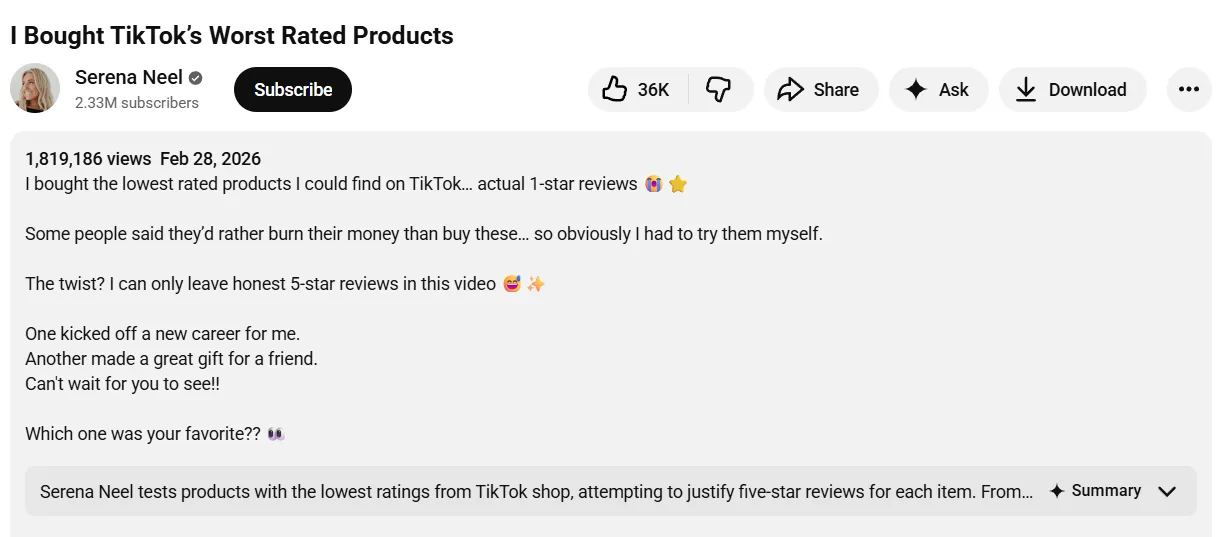
Your channel description sits on your About page and serves a different purpose from your video descriptions. It is not a summary of one video. It is a pitch to every new visitor who lands on your channel page and wants to decide whether subscribing is worth their time.
The channel description has a 1,000-character limit. That is approximately 150 to 200 words. Every word needs to earn its place.
What a good YouTube channel description must cover:
- Who the channel is for: State your target viewer in the first sentence. "This channel is for small business owners who want to grow on YouTube without a production team" is specific. "Welcome to my channel" is not.
- What the channel delivers: Describe the type of content you publish and the specific value it provides. Tutorial videos, product reviews, weekly vlogs, and industry commentary are all specific. "All kinds of videos" is not.
- How often you publish: Include your upload schedule. A viewer deciding whether to subscribe wants to know what they are committing to.
- Primary keywords: YouTube reads your channel description for topic categorization the same way it reads video descriptions. Include your two or three core niche keywords naturally within the first 200 characters.
- A call to action: End with one clear instruction. Subscribe, visit your website, or follow on social media. One CTA is enough.
What to leave out:
- Generic welcome phrases that waste character space
- Lists of every topic you have ever covered
- Personal backstory that does not relate to the viewer's decision to subscribe
YouTube Channel Description Examples and Templates
These three templates cover the most common channel types. Each one stays within the 1,000-character limit. Replace the bracketed placeholders with your own details, then paste into your About page.
Educational and Tutorial Channel
Personal Brand and Vlog Channel
Business and Brand Channel
A good YouTube channel description works the same way across all three templates. It leads with who the channel serves, states what it delivers, and ends with one clear next step. The specific details change. The structure does not.
YouTube Description Best Practices
These six rules apply to every description you write, whether for a video upload or your channel About page.
| Best Practice | Why It Matters |
|---|---|
| Front-load your primary keyword | YouTube and viewers both read left to right. Keywords in the first sentence carry more SEO weight than those buried further down |
| Keep CTAs above the fold | The first 200 characters are visible without clicking Show More. Place your most important link or action within that window |
| Use natural keyword variation | Repeating the same keyword phrase multiple times does not improve ranking. Use synonyms and related phrases to cover more search queries naturally |
| Keep paragraphs short | Long blocks of text in descriptions reduce readability. Two to three sentences per paragraph maximum |
| Update old descriptions when refreshing content | Updating a description on an existing video sends a fresh indexing signal to the algorithm and can improve search ranking on videos that have stalled |
| Never copy the same description across multiple videos | Duplicate descriptions are treated as low-quality metadata by YouTube and can suppress search visibility across all affected videos |
Pro Tip: YouTube Studio allows you to set a default description that pre-populates every new upload. Use this feature to add your permanent links, social media handles, subscribe CTA, and hashtags automatically. You only need to fill in the video-specific sections at the top before publishing. To set it up, go to YouTube Studio, click Settings, then Upload Defaults, and add your template in the Description field.
If you would rather not rebuild the structure by hand each time, the free YouTube description generator assembles the hook, summary, timestamps, links, and hashtags for any video in seconds, then you paste and tweak.
The SEO Studio in ytgrowth.io covers full metadata optimization including description structure, keyword placement, and tag recommendations in one workflow so every upload is optimized before it goes live.
Frequently Asked Questions
How Long Should a YouTube Video Description Be?
YouTube allows up to 5,000 characters for video descriptions. There is no minimum requirement but descriptions under 200 words leave significant keyword and SEO value on the table. A well-structured description of 200 to 350 words covering the six sections in this guide is enough to satisfy both the algorithm and the viewer without padding.
What Should I Put in My YouTube Description?
A complete YouTube video description template covers six elements in order: a keyword-rich opening in the first 200 characters, a video summary with supporting keywords, timestamped chapters for videos over five minutes, a call to action with a next video link, important external links, and three to five hashtags at the bottom.
Does the YouTube Description Affect SEO?
Yes. YouTube reads your description to categorize your video, match it to search queries, and determine suggested video placement. The first 200 characters carry the most weight. Natural keyword placement throughout the full description reinforces the topic signal your title establishes and improves both search ranking and suggested feed placement.
Can I Use the Same Description Template for Every Video?
The structure stays the same across every upload. The content changes. Your keyword opening, video summary, and timestamps are specific to each video and must be written fresh. Your CTA, links, and hashtags can remain consistent across uploads and are best set as a default template in YouTube Studio's Upload Defaults settings.
What Is the Best Description for a YouTube Channel?
A good YouTube channel description leads with who the channel is for, states what it delivers and how often, includes two to three core niche keywords naturally, and ends with one clear call to action. It stays within the 1,000-character limit and avoids generic phrases that waste character space without communicating value to a new visitor.
A Template Saves Time. A Good Template Builds a Channel
A YouTube description template is not just a time-saving tool. It is a consistency system that ensures every upload sends a complete, accurate metadata signal to the algorithm without relying on memory or effort under time pressure.
The structure in this guide works because it is built around what YouTube needs to categorize your content and what viewers need to decide whether to watch. A keyword-rich opening above the fold. A clear video summary with supporting keywords.
Timestamps, CTAs, links, and hashtags in the right order. Apply that structure consistently and your descriptions compound into a searchable content library rather than a collection of undiscoverable uploads.
The same discipline applies to your channel description. A best description for YouTube channel tells every new visitor exactly who the channel is for, what it delivers, and why subscribing is worth their time. One well-written channel description works for you on every visit without needing to be rewritten.
Set your permanent links, social handles, and hashtags as a default template in YouTube Studio Upload Defaults. Fill in the video-specific sections before every upload. That process takes under five minutes and covers everything the algorithm needs to distribute your content accurately.